crud2 Thymeleaf 템플릿 파일별 원본·설명
src/main/resources/templates/ 아래 HTML 템플릿을 파일 단위로 정리했습니다. 아래 코드는 저장소 기준 원본 그대로입니다.
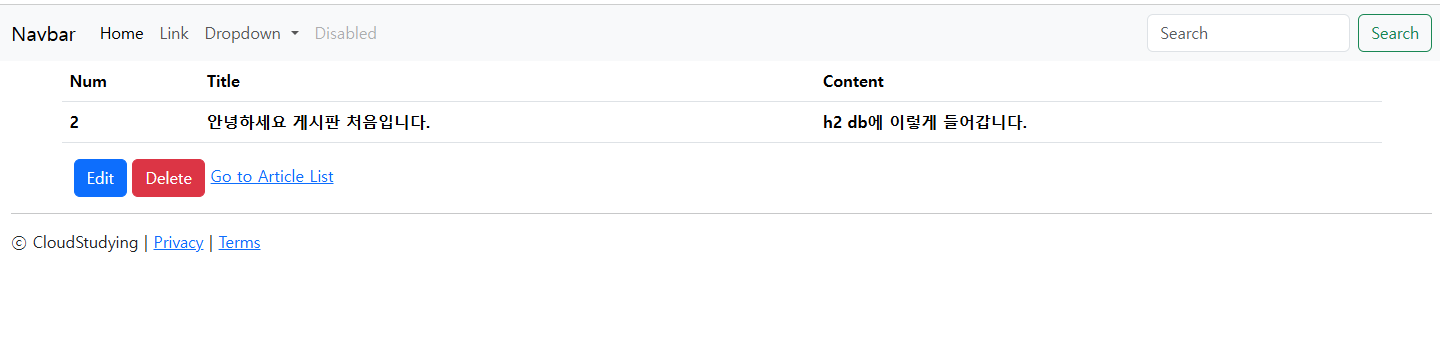
공통:
- 네임스페이스
xmlns:th="http://www.thymeleaf.org"로 Thymeleaf 속성(th:*) 사용 - Spring MVC
Model에 넣은 이름(doDto,DoList,detail,editDto,msg등)과 연결됨
1. layouts/header.html
경로: src/main/resources/templates/layouts/header.html
역할: <head> 조각과 상단 네비·플래시 메시지 조각을 fragment로 정의. 각 페이지에서 th:replace로 끼워 넣음.
원본
<!DOCTYPE html>
<html xmlns:th="http://www.thymeleaf.org">
<head th:fragment="head">
    <meta charset="UTF-8">
    <meta name="viewport"
          content="width=device-width, user-scalable=no, initial-scale=1.0, maximum-scale=1.0, minimum-scale=1.0">
    <meta http-equiv="X-UA-Compatible" content="ie=edge">
    <title th:text="${pageTitle} ?: 'Crud2'">Crud2</title>
    <link href="https://cdn.jsdelivr.net/npm/bootstrap@5.3.6/dist/css/bootstrap.min.css" rel="stylesheet"
          integrity="sha384-4Q6Gf2aSP4eDXB8Miphtr37CMZZQ5oXLH2yaXMJ2w8e2ZtHTl7GptT4jmndRuHDT" crossorigin="anonymous">
</head>
<body>
<div th:fragment="navbar">
    <nav class="navbar navbar-expand-lg bg-body-tertiary">
        <div class="container-fluid">
            <a class="navbar-brand" href="#">Navbar</a>
            <button class="navbar-toggler" type="button" data-bs-toggle="collapse" data-bs-target="#navbarSupportedContent"
                    aria-controls="navbarSupportedContent" aria-expanded="false" aria-label="Toggle navigation">
                <span class="navbar-toggler-icon"></span>
            </button>
            <div class="collapse navbar-collapse" id="navbarSupportedContent">
                <ul class="navbar-nav me-auto mb-2 mb-lg-0">
                    <li class="nav-item">
                        <a class="nav-link active" aria-current="page" href="#">Home</a>
                    </li>
                    <li class="nav-item">
                        <a class="nav-link" href="#">Link</a>
                    </li>
                    <li class="nav-item dropdown">
                        <a class="nav-link dropdown-toggle" href="#" role="button" data-bs-toggle="dropdown" aria-expanded="false">
                            Dropdown
                        </a>
                        <ul class="dropdown-menu">
                            <li><a class="dropdown-item" href="#">Action</a></li>
                            <li><a class="dropdown-item" href="#">Another action</a></li>
                            <li><hr class="dropdown-divider"></li>
                            <li><a class="dropdown-item" href="#">Something else here</a></li>
                        </ul>
                    </li>
                    <li class="nav-item">
                        <a class="nav-link disabled" aria-disabled="true">Disabled</a>
                    </li>
                </ul>
                <form class="d-flex" role="search">
                    <input class="form-control me-2" type="search" placeholder="Search" aria-label="Search"/>
                    <button class="btn btn-outline-success" type="submit">Search</button>
                </form>
            </div>
        </div>
    </nav>
    <div th:if="${msg}" class="alert alert-primary alert-dismissible fade show m-3" role="alert">
        <span th:text="${msg}">message</span>
        <button type="button" class="btn-close" data-bs-dismiss="alert" aria-label="Close"></button>
    </div>
</div>
</body>
</html>
설명
| 요소 | 설명 |
|---|---|
th:fragment="head" |
다른 페이지에서 ~{layouts/header :: head} 로 head 블록만 가져올 때 사용 |
th:fragment="navbar" |
네비게이션 + 알림 영역. ~{layouts/header :: navbar} 로 삽입 |
th:text="${pageTitle} ?: 'Crud2'" |
컨트롤러가 pageTitle을 주면 그걸 쓰고, 없으면 기본 "Crud2" |
| Bootstrap 5 CDN | CSS는 head, JS는 footer 쪽에서 로드 |
th:if="${msg}" |
RedirectAttributes.addFlashAttribute("msg", ...) 로 넘긴 일회성 메시지 표시 (삭제 완료 등) |
2. layouts/footer.html
경로: src/main/resources/templates/layouts/footer.html
역할: 하단 푸터 + Bootstrap JS 번들 (네비 collapse·알림 닫기 등에 필요).
원본
<!DOCTYPE html>
<html xmlns:th="http://www.thymeleaf.org">
<body>
<div th:fragment="footer" class="mb-5 container-fluid">
    <hr>
    <p>ⓒ CloudStudying | <a href="#">Privacy</a> | <a href="#">Terms</a></p>
</div>
<script src="https://cdn.jsdelivr.net/npm/bootstrap@5.3.6/dist/js/bootstrap.bundle.min.js"
        integrity="sha384-j1CDi7MgGQ12Z7Qab0qlWQ/Qqz24Gc6BM0thvEMVjHnfYGF0rmFCozFSxQBxwHKO"
        crossorigin="anonymous"></script>
</body>
</html>
설명
| 요소 | 설명 |
|---|---|
th:fragment="footer" |
~{layouts/footer :: footer} 로 페이지 하단에 삽입 |
| 스크립트 | body 끝에 두어 DOM 로드 후 실행되게 함 |
3. mains/add.html
경로: src/main/resources/templates/mains/add.html
컨트롤러: GET /mains/add → model.addAttribute("doDto", new DoDto())
역할: 새 글 작성 폼 → POST /mains/create
원본
<!DOCTYPE html>
<html xmlns:th="http://www.thymeleaf.org" lang="ko">
<head th:replace="~{layouts/header :: head}"></head>
<body>
<div th:replace="~{layouts/header :: navbar}"></div>
<form th:action="@{/mains/create}" th:object="${doDto}" method="post" class="container">
    <div class="mb-3">
        <label class="form-label" for="title">제목</label>
        <input type="text" class="form-control" id="title" th:field="*{title}">
    </div>
    <div class="mb-3">
        <label class="form-label" for="content">내용</label>
        <textarea class="form-control" id="content" rows="3" th:field="*{content}"></textarea>
    </div>
    <button type="submit" class="btn btn-primary">submit</button>
    <a th:href="@{/list}">Back</a>
</form>
<div th:replace="~{layouts/footer :: footer}"></div>
</body>
</html>
설명
| 요소 | 설명 |
|---|---|
th:replace="~{layouts/header :: head}" |
공통 head로 교체 |
th:replace="~{layouts/header :: navbar}" |
상단 바·플래시 자리 삽입 |
th:action="@{/mains/create}" |
컨텍스트 경로를 반영한 URL 생성 |
th:object="${doDto}" |
폼의 폼 객체를 doDto로 지정 |
th:field="*{title}" |
name/id/value를 doDto.title에 맞게 자동 생성·바인딩 |
th:href="@{/list}" |
목록으로 가는 링크 |
4. mains/doList.html
경로: src/main/resources/templates/mains/doList.html
컨트롤러: GET /list → model.addAttribute("DoList", doList)
역할: 전체 목록 테이블
원본
<!DOCTYPE html>
<html xmlns:th="http://www.thymeleaf.org" lang="ko">
<head th:replace="~{layouts/header :: head}"></head>
<body>
<div th:replace="~{layouts/header :: navbar}"></div>
<table class="table container">
    <thead>
    <tr>
        <th scope="col">Num</th>
        <th scope="col">Title</th>
        <th scope="col">Content</th>
    </tr>
    </thead>
    <tbody>
    <tr th:each="item : ${DoList}">
        <th th:text="${item.num}">1</th>
        <th>
            <a th:href="@{/list/{n}(n=${item.num})}" th:text="${item.title}">title</a>
        </th>
        <th th:text="${item.content}">content</th>
    </tr>
    </tbody>
</table>
<div class="container">
    <a th:href="@{/mains/add}">New</a>
</div>
<div th:replace="~{layouts/footer :: footer}"></div>
</body>
</html>
설명
| 요소 | 설명 |
|---|---|
th:each="item : ${DoList}" |
DoList 컬렉션을 순회하며 행 생성 |
th:text="${item.num}" 등 |
DoIt getter 기준으로 셀에 출력 |
th:href="@{/list/{n}(n=${item.num})}" |
/list/1 형태의 링크 URL 생성 |
th:text="${item.title}" |
링크 안 보이는 글자는 제목 |
New 링크 |
GET /mains/add 로 이동 |
5. mains/detail.html
경로: src/main/resources/templates/mains/detail.html
컨트롤러: GET /list/{num} → model.addAttribute("detail", doIt)
역할: 한 건 상세 + 수정·삭제·목록 링크
원본
<!DOCTYPE html>
<html xmlns:th="http://www.thymeleaf.org" lang="ko">
<head th:replace="~{layouts/header :: head}"></head>
<body>
<div th:replace="~{layouts/header :: navbar}"></div>
<table class="table container" th:if="${detail != null}">
    <thead>
    <tr>
        <th scope="col">Num</th>
        <th scope="col">Title</th>
        <th scope="col">Content</th>
    </tr>
    </thead>
    <tbody>
    <tr>
        <th th:text="${detail.num}">1</th>
        <th th:text="${detail.title}">title</th>
        <th th:text="${detail.content}">content</th>
    </tr>
    </tbody>
</table>
<div class="container" th:if="${detail != null}">
    <a th:href="@{/list/{n}/edit(n=${detail.num})}" class="btn btn-primary">Edit</a>
    <a th:href="@{/list/{n}/delete(n=${detail.num})}" class="btn btn-danger">Delete</a>
    <a th:href="@{/list}">Go to Article List</a>
</div>
<div th:replace="~{layouts/footer :: footer}"></div>
</body>
</html>
설명
| 요소 | 설명 |
|---|---|
th:if="${detail != null}" |
없을 때(리다이렉트 전 등) 빈 테이블 방지. 컨트롤러는 없으면 보통 redirect:/list |
${detail.num} 등 |
detail은 DoIt 엔티티 |
th:href="@{/list/{n}/edit(n=${detail.num})}" |
/list/1/edit 형태 |
th:href="@{/list/{n}/delete(n=${detail.num})}" |
삭제는 GET (튜토리얼 스타일). 확인은 브라우저 confirm 등으로 보강 가능 |
6. mains/edit.html
경로: src/main/resources/templates/mains/edit.html
컨트롤러: GET /list/{num}/edit → model.addAttribute("editDto", new DoDto(...))
역할: 수정 폼 → POST /mains/update
원본
<!DOCTYPE html>
<html xmlns:th="http://www.thymeleaf.org" lang="ko">
<head th:replace="~{layouts/header :: head}"></head>
<body>
<div th:replace="~{layouts/header :: navbar}"></div>
<form th:if="${editDto != null}" th:action="@{/mains/update}" th:object="${editDto}" method="post" class="container">
    <input type="hidden" th:field="*{num}">
    <div class="mb-3">
        <label class="form-label" for="title">제목</label>
        <input type="text" class="form-control" id="title" th:field="*{title}">
    </div>
    <div class="mb-3">
        <label class="form-label" for="content">내용</label>
        <textarea class="form-control" id="content" rows="3" th:field="*{content}"></textarea>
    </div>
    <button type="submit" class="btn btn-primary">submit</button>
    <a th:href="@{/list}">Back</a>
</form>
<div th:replace="~{layouts/footer :: footer}"></div>
</body>
</html>
설명
| 요소 | 설명 |
|---|---|
th:if="${editDto != null}" |
DTO가 없으면 폼 미표시 |
th:field="*{num}" + hidden |
PK를 숨은 필드로 넘겨 POST /mains/update 에서 DoDto.num으로 식별 |
th:action="@{/mains/update}" |
수정 처리 URL (메서드는 POST) |
DoIt에 setter가 없어서 폼은 DTO만 사용하는 구성이 안전함 |
파일·URL 대응 요약
| 템플릿 | 반환하는 컨트롤러 매핑 (대표) |
|---|---|
mains/add |
GET /mains/add |
mains/doList |
GET /list |
mains/detail |
GET /list/{num} |
mains/edit |
GET /list/{num}/edit |
레이아웃 header / footer 는 위 화면들에 조각으로 포함됩니다.
관련 문서
'BackEnd > Spring Boot' 카테고리의 다른 글
| # 도커 한방 정리 (0) | 2026.04.14 |
|---|---|
| crud2 thymeleaf 를 crud1 mustache 로 변경 (0) | 2026.04.13 |
| 6. 스프링부트로 게시판 만들어 보기 - crud2 Doit(entity) (0) | 2026.04.12 |
| 5. 스프링부트로 게시판 만들어 보기 crud2 - aplication-properties (0) | 2026.04.12 |
| 4. 스프링부트로 게시판 만들어 보기 crud2 - controller (1) | 2026.04.11 |


